What Is Powerline Internet? Everything You Need to Know
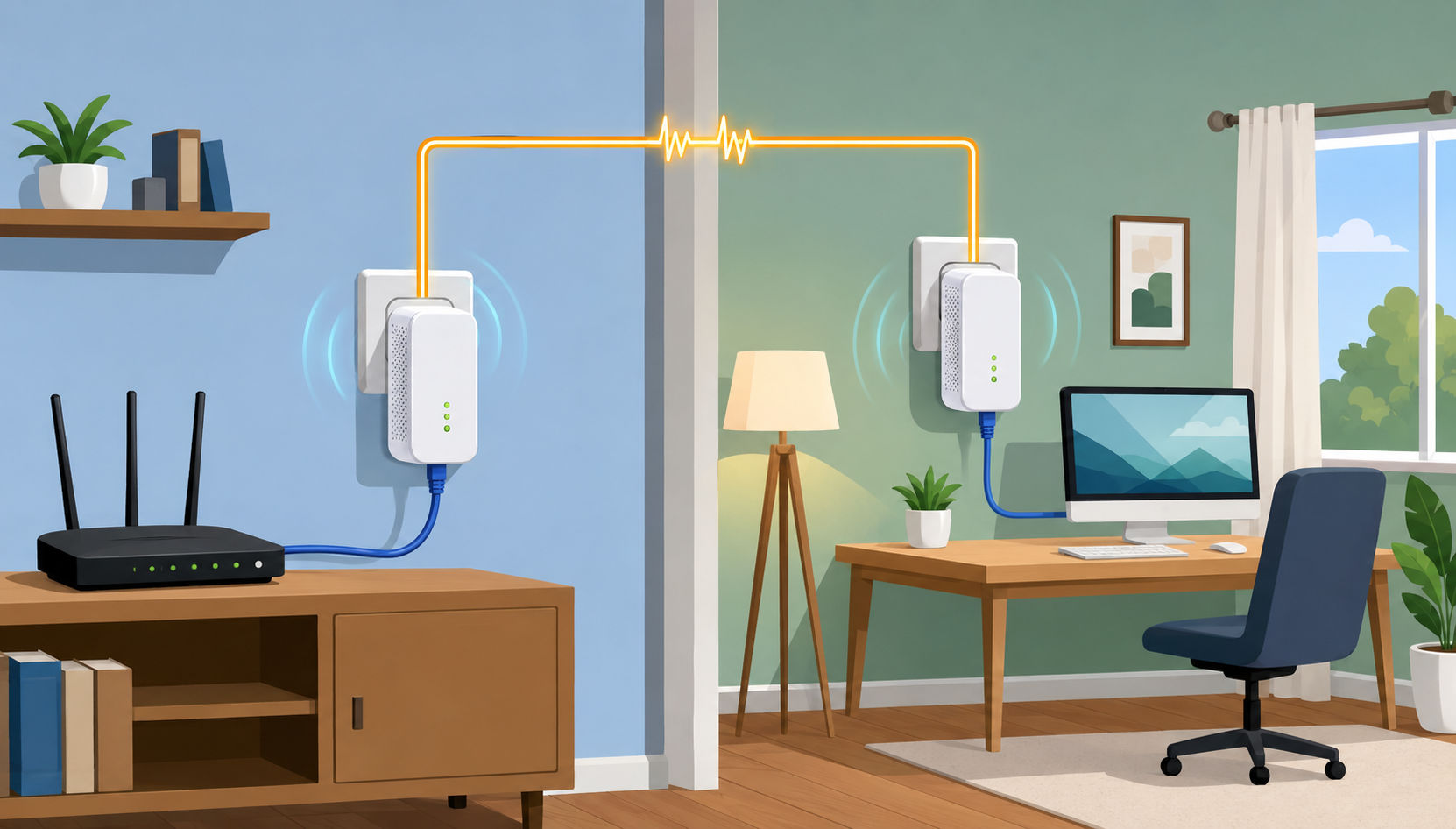
Reliable internet has become essential for working from home, online classes, streaming entertainment, gaming, and managing smart home devices. While Wi-Fi is the most common way to connect, it isn’t always the most dependable—especially in larger homes or buildings with thick walls that weaken wireless signals.
That’s where Powerline Internet comes in. Instead of relying on wireless coverage, Powerline technology uses your home’s existing electrical wiring to extend your internet connection to other rooms. It offers a practical alternative for homeowners and renters who want a faster, more stable connection without installing new Ethernet cables.
Whether you’re dealing with dead zones, unreliable Wi-Fi, or simply want a wired connection in another room, this guide explains how Powerline Internet works, its advantages and limitations, and whether it’s the right solution for your home.
What Is Powerline Internet?
Powerline Internet—often called Powerline Ethernet—is a networking technology that sends internet data through your home’s electrical wiring.
Rather than running long Ethernet cables from your router throughout the house, Powerline adapters transform your electrical outlets into network connection points. Since almost every room already has electrical outlets, Powerline networking provides an easy way to expand internet access without major installation work.
This solution bridges the gap between traditional wired Ethernet and Wi-Fi, offering many of the stability benefits of a wired connection while avoiding the inconvenience of installing new cables.
How Does Powerline Internet Work?
Powerline networking works using at least two adapters.
Step 1: Connect the First Adapter
The first adapter plugs into a wall outlet near your modem or router. An Ethernet cable connects the adapter directly to the router.
This adapter injects internet data into your home’s electrical wiring.
Step 2: Connect the Second Adapter
Place the second adapter into a wall outlet wherever you need internet access.
This could be:
A home office
A bedroom
A basement
An entertainment center
A gaming room
The adapter receives the internet signal through the electrical wiring and provides an Ethernet connection for nearby devices.
Many newer Powerline adapters also include built-in Wi-Fi, allowing them to create a new wireless access point in rooms where your original Wi-Fi signal is weak.
Why Homeowners Choose Powerline Internet
Powerline Internet has grown in popularity because it solves one of the biggest frustrations in home networking: inconsistent Wi-Fi coverage.
Wireless signals weaken as they travel through walls, floors, furniture, and appliances. Large homes often experience dead zones where the signal becomes unreliable.
Instead of trying to push a wireless signal farther, Powerline technology uses your home’s electrical system as the pathway.
For many households, this results in:
More consistent internet speeds
Lower latency
Better video call quality
More reliable streaming
Improved online gaming performance
If you’re deciding between networking options, understanding the differences between Powerline Internet and traditional Wi-Fi can help you determine which setup best fits your home.
Key Benefits of Powerline Internet
Simple Plug-and-Play Installation
One of the biggest advantages is how easy it is to set up.
Unlike running Ethernet cables through walls or installing additional networking hardware, Powerline adapters typically require only a few minutes.
The installation process usually involves:
Plugging in the first adapter.
Connecting it to your router.
Plugging in the second adapter.
Pairing the devices if necessary.
Most adapters are ready to use immediately without complicated configuration.
More Reliable Than Weak Wi-Fi
Wireless signals are affected by numerous obstacles.
Powerline networking avoids many of these issues because data travels through electrical wiring instead of open air.
This often produces a more stable connection for:
Video conferencing
Remote work
Online classes
Smart TVs
Gaming consoles
Desktop computers
Cost-Effective Home Networking
Powerline adapters generally cost much less than hiring someone to install Ethernet wiring throughout a home.
They also provide an affordable alternative to purchasing an entire mesh Wi-Fi system.
For households looking to improve internet performance while keeping costs under control, understanding how everyday online activities affect internet data usage can also help you choose the right internet plan alongside the right networking equipment.
Great for Renters
Renters often can’t drill holes or modify walls.
Powerline networking requires no permanent changes, making it ideal for apartments, condos, and rental homes.
Simply unplug the adapters and take them with you when you move.
When Is Powerline Internet the Best Choice?
Powerline Internet isn’t designed to replace every networking solution. Instead, it excels in specific situations.
It may be the right choice if:
You Have Wi-Fi Dead Zones
If certain rooms consistently receive poor wireless coverage, Powerline adapters can provide a much stronger connection.
You Need Stable Internet for Work
Video calls become frustrating when your connection constantly drops.
A Powerline connection often delivers lower latency and greater stability for remote workers.
You Play Online Games
Competitive gaming benefits from consistent network performance.
Although Powerline cannot always match a direct Ethernet cable, it generally provides lower latency than weak Wi-Fi connections.
You Stream 4K Content
Streaming services require stable bandwidth.
Powerline networking can reduce buffering in rooms where wireless coverage struggles.
You Can’t Install Ethernet Cables
Many homeowners don’t want to open walls or hire electricians simply to improve internet coverage.
Powerline networking fills this gap perfectly.
How Fast Is Powerline Internet?
Modern Powerline adapters support impressive speeds.
Common speed ratings include:
500 Mbps
600 Mbps
1,000 Mbps
1,200 Mbps
2,000 Mbps
2,400 Mbps
However, it’s important to understand that these advertised numbers represent theoretical maximum speeds.
Real-world performance depends on several factors.
Age of Your Home’s Wiring
Newer electrical systems generally produce better results than aging wiring.
Old electrical infrastructure may reduce both speed and reliability.
Distance Between Adapters
The farther apart the adapters are, the more signal loss may occur.
Electrical Interference
Large appliances can introduce electrical noise.
Common examples include:
Microwaves
Vacuum cleaners
Hair dryers
Refrigerators
Air conditioners
These devices can temporarily affect Powerline performance.
Electrical Circuits
Powerline adapters perform best when connected to outlets on the same electrical circuit.
Connections across separate breaker panels or complex electrical layouts may reduce speeds.
Understanding the underlying infrastructure behind your connection—including how copper broadband technology delivers internet service—can provide additional insight into why network performance varies from one household to another.
Powerline Internet vs Wi-Fi
Both technologies have strengths.
Powerline Internet
Pros
Stable connection
Lower latency
Better for gaming
Better for video conferencing
No additional wiring
Cons
Depends on electrical wiring quality
Can be affected by electrical interference
Requires physical outlets
Wi-Fi
Pros
Works with mobile devices
Easy to expand
No cables needed
Cons
Signal weakens through walls
More susceptible to interference
Higher latency
Many households actually benefit from combining both technologies instead of choosing only one.
Powerline Internet vs Mesh Wi-Fi
Mesh Wi-Fi has become increasingly popular for large homes.
A mesh system uses multiple wireless nodes to extend coverage throughout the property.
Powerline networking takes a different approach by using electrical wiring instead of wireless backhaul.
Mesh Wi-Fi is often better for:
Large families
Many mobile devices
Multi-story homes
Continuous wireless coverage
Powerline networking is often better for:
Home offices
Desktop computers
Gaming setups
Streaming devices
Smart TVs
If you’re considering both options, learning how Wi-Fi extenders compare with modern mesh Wi-Fi systems can make the decision much easier.
Common Limitations of Powerline Internet
Although Powerline technology works well in many homes, it’s not perfect.
Older Electrical Wiring
Older homes may contain wiring that wasn’t designed with data transmission in mind.
Performance can vary significantly depending on the condition of the electrical system.
Surge Protectors Can Reduce Performance
Powerline adapters should plug directly into wall outlets.
Using surge protectors or power strips can weaken the signal.
Electrical Noise
Heavy electrical appliances may temporarily reduce performance when operating.
Circuit Separation
Some homes have multiple electrical circuits that limit communication between adapters.
Testing the adapters in your home is the best way to determine actual performance.
Tips for Getting the Best Performance
To maximize Powerline Internet speeds:
Plug adapters directly into wall outlets.
Avoid surge protectors whenever possible.
Keep adapters away from high-interference appliances.
Choose newer Powerline AV2 adapters for better speeds.
Update adapter firmware when available.
Position adapters on the same electrical circuit whenever possible.
Small adjustments can noticeably improve connection quality.
Is Powerline Internet Worth It?
For many households, the answer is yes.
Powerline Internet offers an excellent balance of affordability, convenience, and reliability.
It won’t completely replace Ethernet for maximum performance, and it isn’t always ideal for every home’s electrical system. However, it often delivers a significant improvement over weak Wi-Fi connections without requiring expensive renovations or professional installation.
If your home has frustrating dead zones, unreliable video calls, or inconsistent streaming performance, Powerline networking can be a practical solution that takes only minutes to set up.
Rather than replacing your existing network, many homeowners use Powerline adapters alongside Wi-Fi to create a faster, more dependable home internet experience.
Frequently Asked Questions
Does Powerline Internet work in every home?
Not always. Performance depends largely on the condition of your home’s electrical wiring and whether the outlets are connected through compatible circuits.
Is Powerline Internet faster than Wi-Fi?
In areas where Wi-Fi signals are weak, Powerline Internet often provides faster and more consistent performance. In rooms with excellent Wi-Fi coverage, the difference may be minimal.
Can multiple devices use Powerline Internet?
Yes. Many adapters include multiple Ethernet ports, and some models create a wireless access point that supports multiple Wi-Fi devices.
Does Powerline Internet slow down my electricity?
No. Powerline adapters transmit data over your electrical wiring without affecting your home’s electrical power or increasing electricity usage in any meaningful way.
Should I choose Powerline Internet or a mesh Wi-Fi system?
It depends on your needs. Mesh Wi-Fi is ideal for whole-home wireless coverage, while Powerline Internet is often the better choice for stationary devices that benefit from a stable wired connection.
Related Posts
 Broadband Deals
cable deal
cheap internet deals
Technology
Broadband Deals
cable deal
cheap internet deals
Technology
Fixed Wireless vs 5G Home Internet: Better Than Cable?
Compare fixed wireless and 5G home internet with cable internet. Learn the pros, cons, speeds, costs, and which option fits your home best.
 Broadband Deals
cheap internet plans
Broadband Deals
cheap internet plans
Spectrum Internet Cost After 12 Months Explained
Learn how much Spectrum Internet costs after promotional pricing ends. Discover standard rates, billing factors, and ways to reduce monthly costs.
 Internet Bundles
Broadband Deals
Internet Bundles
Broadband Deals
Best Rural Internet Providers to Keep You Connected in 2026
Discover the best rural internet providers in 2026. Compare Xfinity, CenturyLink, and Viasat by speed, pricing, reliability, and coverage.
 Broadband Deals
cheap internet deals
cheap internet plans
Broadband Deals
cheap internet deals
cheap internet plans
Portland ISP Providers: How to Find the Best Internet Service
Compare Portland ISP providers, internet speeds, pricing, and availability. Learn how to choose the best internet service for your home or business.
 Internet Bundles
AT&T Business Internet: Plans, Speeds & Benefits Explained
Learn everything about AT&T Business Internet, including plans, speeds, fiber availability, pricing, features, equipment, and how to choose the best option.