Internet Speed, Latency, and Jitter Explained
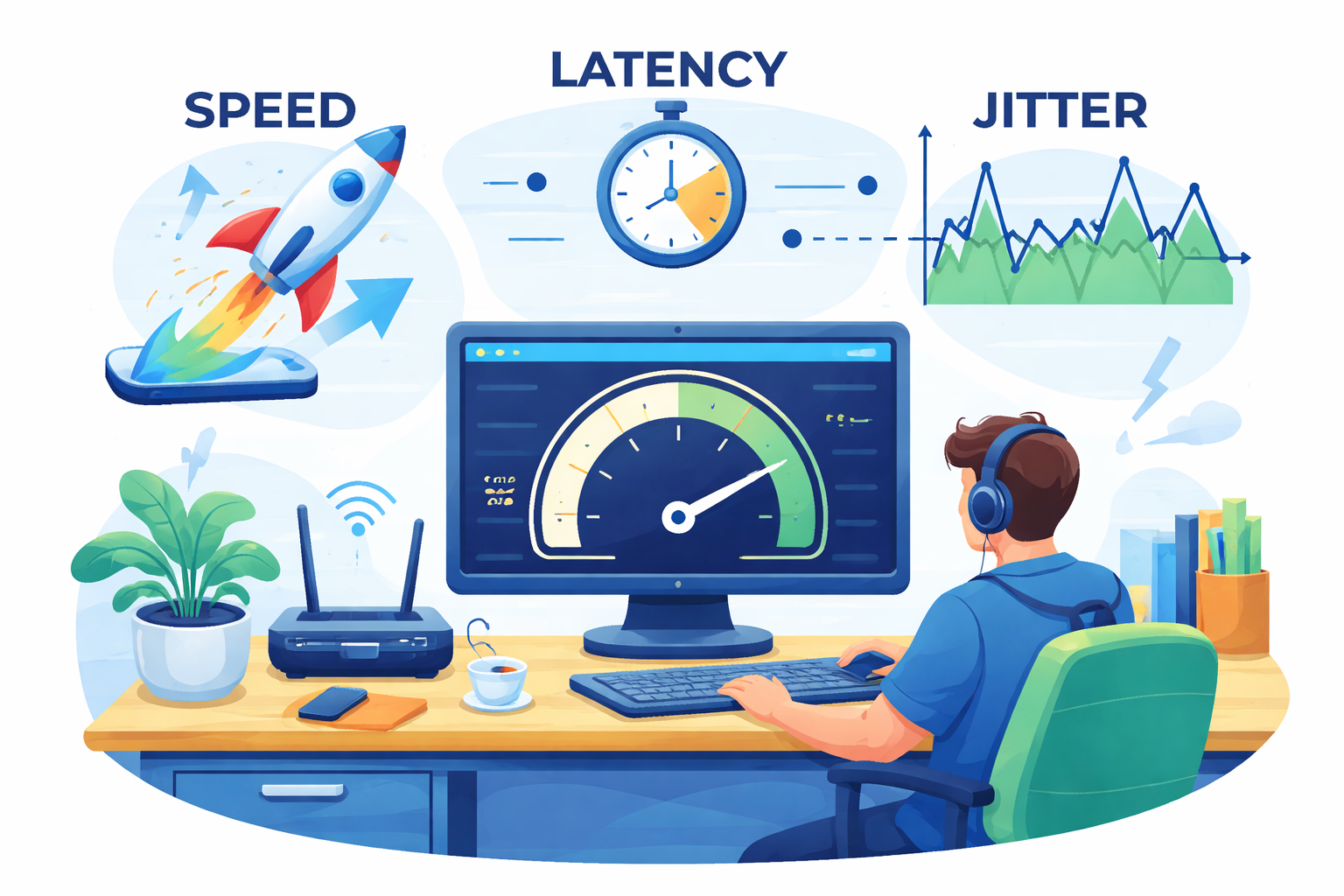
When you run an internet speed test, the results can seem simple at first glance. You see a few numbers, but it is not always obvious what they actually tell you about your connection. Is a higher number always better? Which number matters most for streaming, gaming, video calls, or working from home?
To make sense of it, you need to understand three core measurements: speed, latency, and jitter. Each one affects your online experience in a different way. A fast plan may still feel frustrating if latency is too high, and even a decent connection can feel unstable if jitter keeps jumping around.
If you have ever looked at the results from an online internet speed test that shows your real-time connection performance and felt unsure about what the numbers mean, this breakdown will help. Below, you will learn what each metric measures, when it matters most, and how to tell whether your connection is actually performing well.
Why Speed Test Numbers Matter
Most people focus on download speed because it is the easiest number to recognize. That makes sense, but it only tells part of the story.
Your internet connection is not judged by speed alone. A connection can look good on paper and still feel slow when web pages lag, video calls freeze, or games respond late. That is why the full picture matters. Speed affects how much data can move at once. Latency affects how quickly actions respond. Jitter affects how consistent that response stays over time.
Once you understand how these three work together, it becomes much easier to know whether your internet is actually meeting your needs.
What Internet Speed Means
Speed refers to how quickly your connection can send or receive data. In simple terms, it measures the rate at which information moves between your device and the internet.
There are two main parts of internet speed:
Download Speed
Download speed is how fast your device receives data from the internet. This affects activities like:
Opening websites
Watching videos
Downloading files
Streaming music
Loading social media feeds
When people talk about having “fast internet,” they are usually talking about download speed.
Upload Speed
Upload speed is how fast your device sends data out. This matters for activities like:
Uploading files to cloud storage
Sending large email attachments
Posting videos
Joining video meetings
Live streaming
Upload speed often gets less attention, but it can be just as important, especially for remote work or content creation.
How Speed Is Measured
Internet speed is usually measured in Mbps, which stands for megabits per second. The higher the Mbps, the more data your connection can transfer each second.
You may also see Gbps, or gigabits per second. One Gbps equals 1,000 Mbps.
That means:
100 Mbps is solid for many households
300 Mbps gives more breathing room for multiple users
1 Gbps is considered very fast and is ideal for heavier use
Still, faster is not always necessary. The right speed depends on how many people are using the connection and what they are doing online.
How Much Speed Do You Really Need?
There is no universal answer because internet usage varies from one home to another. A person browsing the web and checking email needs far less speed than a family streaming 4K video across multiple devices.
Here are some practical benchmarks:
For Basic Browsing and Email
A few Mbps is often enough for light browsing, reading articles, checking email, and using simple apps. Modern websites, however, are heavier than they used to be, so a little extra speed helps pages load more smoothly.
For HD and 4K Streaming
Streaming quality affects bandwidth needs quite a bit.
A general rule of thumb looks like this:
Around 3 Mbps for standard-definition streaming
Around 5 to 10 Mbps for HD streaming
Around 25 to 30 Mbps for 4K streaming
If multiple people are streaming at the same time, the required speed climbs fast.
For Remote Work and Video Calls
Video meetings need both decent download and upload performance. If upload speed is weak, your calls may look blurry to others even if everything seems fine on your screen.
For Large Households
If several people are gaming, streaming, browsing, and using smart devices at once, total speed matters more. You are not just supporting one activity. You are supporting the sum of everything happening at the same time.
That is why a connection that feels fine for one person may struggle in a busy household.
What Latency Means
Latency is the time it takes for data to travel from your device to its destination and back again. In other words, it measures delay.
If speed is about capacity, latency is about reaction time.
Every time you click a link, start a video, load a game, or send a message, your device makes a request. That request travels to a server, the server responds, and the information starts coming back. The amount of time this takes is your latency.
Why Low Latency Matters
You want internet speed to be high, but you want latency to be low.
Lower latency means:
Faster response when clicking a page
Smoother online gaming
Better video calling
More responsive cloud apps
Less delay in real-time communication
High latency creates a noticeable lag between your action and the result. That is why a connection can technically be “fast” but still feel sluggish.
How Latency Is Measured
Latency is measured in milliseconds, written as ms.
The lower the number, the better the response time.
For example:
Under 20 ms is excellent for most uses
20 to 50 ms is very good
50 to 100 ms is acceptable for many everyday tasks
Over 100 ms starts to feel delayed in more sensitive activities
Very high latency can make gaming, calls, and live interaction frustrating
You may also hear the term ping. Ping is commonly used as another way to describe round-trip latency, especially in gaming and speed tests.
Why Latency Matters More Than You Think
A common misconception is that online gaming mainly depends on extremely high internet speed. In reality, gaming often depends more on low latency than raw bandwidth.
Most online games do not use massive amounts of data. What they need is quick, consistent communication between your device and the game server. If that signal is delayed, your actions feel late. That is when movement feels off, hits do not register properly, or opponents seem to react before you do.
The same principle applies to video calls. You do not just need enough bandwidth to carry the call. You also need low enough latency so the conversation feels natural instead of awkward and delayed.
This is one reason many people still see better performance when using a wired connection. Wi-Fi adds another layer between your device and the router, and that can increase delay. Ethernet is often the safer option when low latency matters most.
What Causes High Latency?
Latency is influenced by more than one factor. Some of the most common include:
Distance to the Server
The farther your data has to travel, the longer it takes. If the server is across the country or in another region, latency usually rises.
Network Congestion
Busy networks can slow response times, especially during peak usage hours.
Wi-Fi Interference
Wireless connections are convenient, but they are more vulnerable to interference. Walls, distance, nearby devices, and crowded channels can all affect performance.
The 2.4 GHz Wi-Fi band, in particular, tends to be slower and more crowded than 5 GHz. That does not always make it bad, but it can contribute to extra delay.
Router or Hardware Issues
Old routers, overloaded devices, or outdated firmware can create delays even if your internet plan is otherwise decent.
ISP Routing and Network Conditions
Sometimes the issue is not inside your home at all. Internet traffic may take a less efficient route, or there may be broader network issues affecting response time.
What Jitter Means
Jitter measures how much latency varies from one data packet to the next.
That may sound technical, but the idea is simple. Data does not travel as one solid stream. It moves in small units called packets. Ideally, those packets arrive at a steady, predictable pace.
When they do, your connection feels smooth.
When the timing keeps changing, you get jitter.
A Simple Way to Think About Jitter
Imagine latency as the travel time for a series of cars on the same road. If every car arrives with nearly the same timing, traffic feels steady. If some arrive quickly and others get delayed for no clear reason, the flow becomes uneven.
That unevenness is jitter.
How Jitter Is Measured
Like latency, jitter is measured in milliseconds.
Lower jitter is better because it means your connection is more consistent. High jitter means packets are arriving with irregular timing, and that can create noticeable problems in real-time activities.
Why Jitter Can Ruin a Good Connection
Jitter often goes unnoticed during basic browsing. You might not care if one webpage takes half a second longer to load.
But in real-time applications, jitter matters a lot.
High jitter can lead to:
Choppy video calls
Robotic or broken audio
Stuttering during online games
Buffering during live streams
Inconsistent performance in cloud-based tools
This is why a connection can show decent download speed and still feel unreliable. If latency keeps swinging up and down, the experience becomes unstable even when the average numbers look fine.
Speed vs. Latency vs. Jitter
These three metrics work together, but they are not interchangeable.
Speed Is Capacity
Speed tells you how much data your connection can carry.
This matters for downloading, streaming, and supporting multiple devices at once.
Latency Is Response Time
Latency tells you how quickly the connection reacts.
This matters for gaming, video calls, browsing responsiveness, and anything interactive.
Jitter Is Consistency
Jitter tells you how stable that response time is.
This matters most when real-time communication or smooth playback depends on steady packet delivery.
A healthy internet connection is not just fast. It is also responsive and stable.
What a “Good” Speed Test Looks Like
There is no single perfect speed test result for everyone, but there are signs of a healthy connection.
A good result usually includes:
Download speed that fits your household usage
Upload speed strong enough for video calls and uploads
Low latency for responsive performance
Low jitter for stability
For example, a 30 Mbps connection with low latency and low jitter may feel much better than a 100 Mbps connection with severe delay and inconsistent packet timing.
That is why speed alone should never be the only number you watch.
How to Improve Speed, Latency, and Jitter
If your speed test results are weaker than expected, there are a few practical ways to improve performance.
Use Ethernet When Possible
A wired connection is one of the best ways to reduce latency and jitter. It gives you a more direct, stable link than Wi-Fi.
Move Closer to the Router
If you rely on Wi-Fi, physical distance matters. The farther you are from the router, the more signal quality may drop.
Reduce Network Congestion
Too many active devices at once can strain your connection. Streaming, large downloads, cloud backups, and smart home devices all share bandwidth.
Restart or Upgrade Your Router
Older equipment can hold back performance. A reboot may help in the short term, but outdated hardware may need replacement.
Use the Right Wi-Fi Band
5 GHz often performs better for speed and lower latency at shorter range, while 2.4 GHz travels farther but is usually more crowded and slower.
Check Your Internet Plan
Sometimes the issue is not your setup. It may simply be that your plan no longer matches your usage. If that is the case, comparing low-latency and affordable internet plans in your area can help you find a better fit.
Why These Metrics Matter for Everyday Internet Use
Understanding speed, latency, and jitter helps you diagnose problems more accurately.
If movies buffer, you may need more speed.
If gaming feels delayed, latency is likely the bigger issue.
If calls break up even when your connection seems fast, jitter may be the reason.
That makes speed tests much more useful. Instead of just checking whether one number is high enough, you can identify what is actually affecting the experience.
Final Thoughts
Internet speed test results are only confusing until you know what each number represents. Once you understand the difference between speed, latency, and jitter, the results become much easier to read.
Speed tells you how much data your connection can move. Latency tells you how quickly it reacts. Jitter tells you how stable that response stays over time.
All three matter, but they matter in different ways. If you want a better internet experience, do not focus on speed alone. A connection that is fast, responsive, and consistent will always feel better than one that only looks impressive in a single number.
Related Posts
 cheap internet deals
cheap internet plans
cheap internet deals
cheap internet plans
Why Utah and the Mountain West Attract Remote Workers
Discover why Utah and the Mountain West are attracting remote workers with affordable living, reliable internet, lower utility costs, and growth.
 Technology
Why Your Internet Keeps Disconnecting and How to Fix It
Learn why your internet keeps disconnecting and discover proven fixes for router issues, Wi-Fi interference, faulty cables, and network instability.
 Broadband Deals
cheap internet deals
Subscription
Broadband Deals
cheap internet deals
Subscription
Affordable Internet and TV Bundles for the 2026 World Cup
Compare affordable internet and TV bundles for sports fans and enjoy reliable coverage of the 2026 World Cup without overspending.
 Internet Bundles
How to Detect ISP Throttling and Improve Your Internet Speed
Learn how to detect ISP throttling, identify common warning signs, test your connection, and improve internet speed for streaming, gaming, and work.
 cheap internet deals
cheap internet plans
cheap internet offers
cheap internet deals
cheap internet plans
cheap internet offers
Which ISP Offers the Best Long-Term Price Stability?
Compare ISPs with the most stable long-term pricing. Learn how to avoid bill increases, evaluate plans, and choose affordable internet service.