How to Cut Internet Bills With Your Mobile Phone Plan
Internet bills can add up fast, especially if you mostly go online through your phone, tablet, or laptop. For many people, a traditional home internet line is not always necessary. A smart mobile phone plan, paired with mobile hotspot features, can help reduce monthly internet costs without giving up everyday access.
Most major wireless carriers now include hotspot data on many phone plans, although limits and speeds vary by plan. AT&T, for example, lists hotspot data across several unlimited plans, while T-Mobile offers separate mobile hotspot data options for people who need portable internet access.
If you already use your phone for browsing, email, social media, navigation, and streaming, switching more of your internet activity to mobile data may be a practical way to save money. The key is choosing a plan that matches your real usage instead of paying for internet service you barely use.
Why Mobile Internet Can Lower Your Monthly Bills
A home internet connection is useful, but it is not always essential. If you live alone, travel often, rent a small space, or only need basic online access, your phone may already provide most of the internet connection you need.
Instead of paying for both home internet and mobile data, you can compare your current bill against the cost of a stronger mobile plan. In some cases, upgrading your phone plan may still be cheaper than keeping a separate internet service.
This is especially helpful for light internet users. If your online activity includes checking emails, messaging, browsing websites, online banking, and occasional video calls, a mobile-first setup may work well.
You can also save more by choosing a more affordable cellphone plan for everyday mobile internet use instead of paying for a large home internet package you do not fully need.
How Your Phone Becomes a Wi-Fi Hotspot
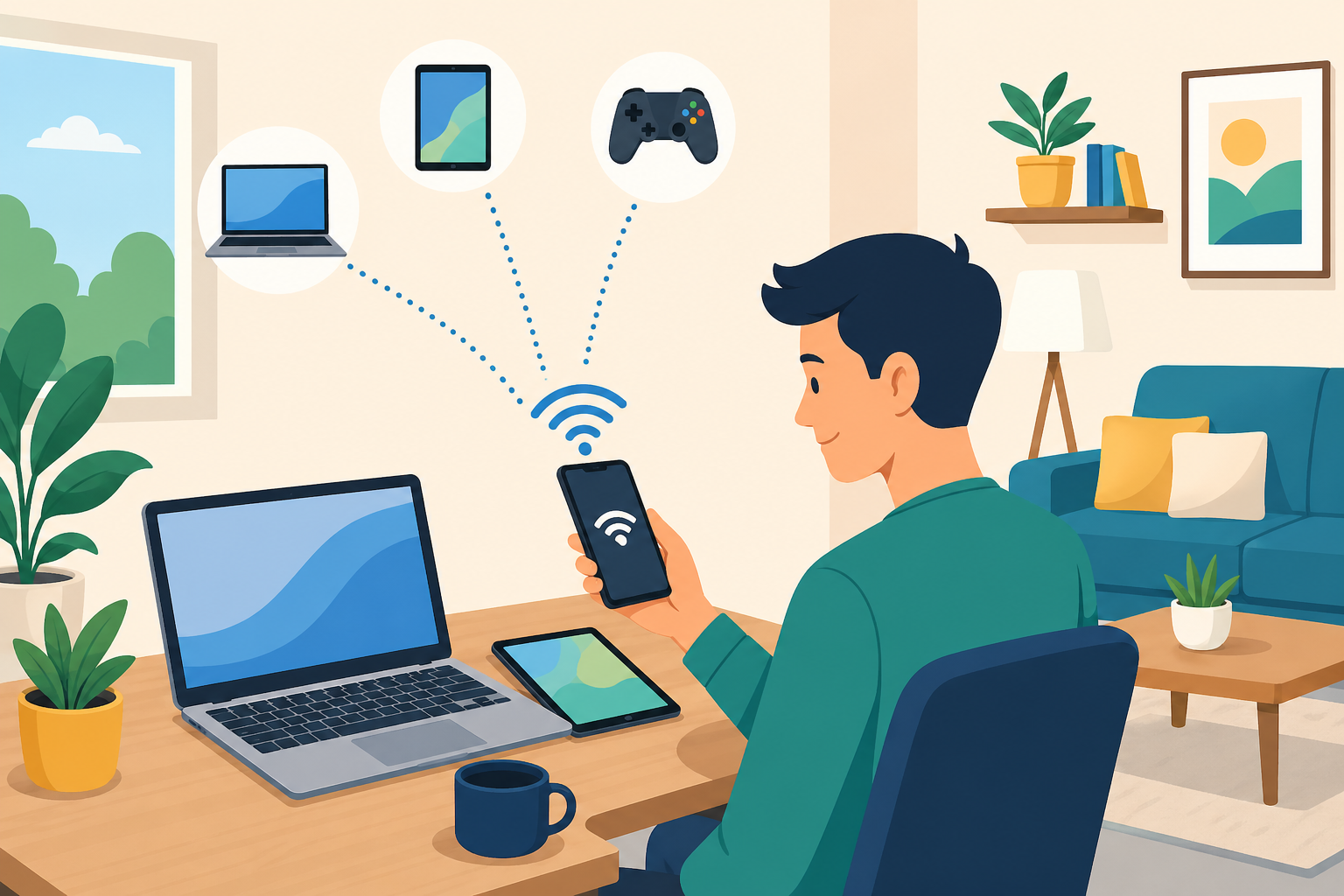
A mobile hotspot lets your phone share its data connection with other devices. That means your laptop, tablet, or another phone can connect to the internet through your mobile plan.
Most smartphones can create a Wi-Fi hotspot from the settings menu. Once turned on, your phone works like a small router. You connect your other devices using the hotspot name and password.
Hotspot access can be useful when you need to work from a laptop, join a video meeting, send files, or browse on a larger screen. It gives you flexibility without requiring a separate modem or home broadband line.
However, hotspot use depends on your plan. Some plans include generous hotspot data, while others include only a small amount or slow speeds after you reach a limit. Always review the details before relying on your phone as your main internet source.
When Using Only Your Phone Makes Sense
Using your mobile phone as your main internet connection works best when your usage is moderate. It can be a smart option if you do not stream video for hours every day or connect many devices at once.
It may be ideal for students, renters, remote workers with light tasks, frequent travelers, and people who live in areas where wired internet is expensive or unreliable.
It can also work well as a temporary setup. If you are moving, waiting for home internet installation, or staying somewhere short-term, your phone hotspot can keep you connected without signing a long contract.
The biggest advantage is control. You can adjust your plan, monitor your data, and avoid paying for a fixed-line service that does not match your lifestyle.
The Limits of Mobile Hotspot Internet
Mobile hotspot internet is convenient, but it is not perfect. The biggest limitation is data usage.
Streaming video, downloading large files, online gaming, cloud backups, and frequent video calls can use data quickly. Once you reach your hotspot limit, your carrier may slow your speed significantly.
Battery life is another concern. Running a hotspot can drain your phone faster than normal use. If you rely on it daily, you may need to keep your phone plugged in or carry a power bank.
Performance can also vary based on location, network congestion, signal strength, and device quality. A strong 5G signal can feel fast, but weak coverage may make browsing frustrating.
That is why mobile internet works best when you understand your habits before replacing home internet completely.
Mobile Phone Hotspot vs. Separate Mobile Hotspot Device
A phone hotspot is the easiest option because you already own the device. You do not need extra equipment, and you can turn it on whenever you need it.
A separate mobile hotspot device may be better if you connect several devices often. These devices are built specifically for sharing internet and may offer better battery life, stronger antennas, and more stable connections.
They can be useful for a home office, small team, travel setup, or backup internet connection. Some users prefer them because they keep phone battery and phone performance separate from internet sharing.
The downside is cost. You may need to buy the device and pay for a separate data plan. Before choosing this route, compare the total monthly cost against your current home internet bill.
How to Choose the Right Mobile Plan
The best mobile internet plan is not always the one labeled “unlimited.” Many unlimited plans have separate hotspot limits, speed rules, or network management terms.
Start by checking how much data you currently use. Your phone settings usually show monthly data usage. If you already have home internet, your provider account may also show household usage.
Next, look at your daily habits. A person who mainly checks email and browses websites needs far less data than someone who streams movies, uploads videos, or joins long video calls.
Then compare plan details carefully. Look for hotspot allowance, high-speed data limits, video streaming quality, coverage in your area, and what happens after you use the included hotspot data.
A cheaper plan is only a good deal if it supports the way you actually use the internet.
Ways to Use Less Data and Save More
Reducing data use can make a mobile-only internet setup much more affordable. Small changes can stretch your plan further.
Lower video streaming quality when watching on mobile data. Standard definition uses much less data than high-definition or 4K streaming.
Turn off automatic cloud backups unless you are connected to Wi-Fi. Photo, video, and file backups can quietly use large amounts of data in the background.
Download music, podcasts, maps, and documents ahead of time when you have access to free or trusted Wi-Fi. This keeps your mobile data available for more important tasks.
You can also disable automatic app updates over mobile data. Let updates happen only when connected to Wi-Fi or when you intentionally approve them.
These habits help you avoid surprise slowdowns and make a lower-cost plan more realistic.
When You Should Keep Home Internet
Mobile internet is not the right answer for everyone. If your household has multiple people streaming, gaming, working, and studying at the same time, home internet may still be the better value.
A fixed broadband connection usually handles heavier use better. It is also more reliable for smart TVs, gaming consoles, home security systems, and remote work setups that need steady performance.
You should also keep home internet if you upload large files, run online meetings every day, or use cloud software for work. In these cases, mobile hotspot data may run out too quickly.
The goal is not to force every household into a mobile-only setup. The goal is to avoid paying for more internet than you need.
A Smart Middle Ground: Mobile Internet as Backup
You do not have to cancel home internet completely to save money. Sometimes the best option is a smaller home internet plan plus a reliable mobile plan.
For example, you might downgrade your home internet speed and use your phone hotspot when you need extra flexibility. This can reduce monthly costs while keeping a dependable connection at home.
Mobile internet also works well as a backup during outages. If your home internet goes down, your phone hotspot can keep you online for urgent tasks.
This setup gives you the security of home internet and the mobility of cellular data without overspending on both.
Practical Steps Before You Cancel Home Internet
Before cutting your home internet service, test your phone hotspot for at least a few days. Use it the same way you normally use your home connection.
Try browsing, video calls, streaming, file uploads, and laptop work. Pay attention to speed, battery life, signal strength, and how quickly your hotspot data is used.
Check your carrier’s coverage at home, at work, and in the places where you use internet most often. A plan that works well in one area may not perform the same somewhere else.
Finally, compare the real monthly cost. Include taxes, fees, device payments, hotspot add-ons, and any discounts. The cheapest-looking plan is not always the cheapest after everything is included.
FAQ
Can I use my mobile phone as my main internet connection?
Yes, you can use your phone as your main internet connection if your plan includes enough hotspot data and your usage is not too heavy. It works best for browsing, email, messaging, light streaming, and occasional laptop use.
Does using a hotspot cost extra?
It depends on your carrier and plan. Some plans include hotspot data, while others require an add-on or limit hotspot speeds after a certain amount of use.
Will a mobile hotspot replace home Wi-Fi?
It can replace home Wi-Fi for light or moderate users. However, heavy streamers, gamers, families, and remote workers may still need a fixed home internet connection.
Does hotspot use drain phone battery?
Yes. Hotspot use can drain your phone battery quickly, especially when multiple devices are connected. Keeping your phone charged or using a dedicated hotspot device can help.
What is better: phone hotspot or mobile hotspot device?
A phone hotspot is simpler and cheaper if you only connect occasionally. A separate mobile hotspot device may be better for frequent use, multiple devices, or better battery life.
How can I avoid using too much mobile data?
Lower video quality, turn off automatic app updates, limit cloud backups, download content ahead of time, and monitor your usage through your phone settings.
Conclusion
Using your mobile phone to cut internet bills can be a smart move when your online habits are simple, flexible, and easy to manage. A strong mobile plan with hotspot access may reduce or even replace the need for a separate home internet bill.
The best approach is to test your usage first, compare plan details carefully, and avoid paying for internet service you do not fully use. With the right plan and better data habits, your phone can become a practical way to stay connected while keeping monthly costs under control.
Related Posts
 cheap internet deals
cheap internet plans
cheap internet deals
cheap internet plans
Why Utah and the Mountain West Attract Remote Workers
Discover why Utah and the Mountain West are attracting remote workers with affordable living, reliable internet, lower utility costs, and growth.
 Technology
Why Your Internet Keeps Disconnecting and How to Fix It
Learn why your internet keeps disconnecting and discover proven fixes for router issues, Wi-Fi interference, faulty cables, and network instability.
 Broadband Deals
cheap internet deals
Subscription
Broadband Deals
cheap internet deals
Subscription
Affordable Internet and TV Bundles for the 2026 World Cup
Compare affordable internet and TV bundles for sports fans and enjoy reliable coverage of the 2026 World Cup without overspending.
 Internet Bundles
How to Detect ISP Throttling and Improve Your Internet Speed
Learn how to detect ISP throttling, identify common warning signs, test your connection, and improve internet speed for streaming, gaming, and work.
 cheap internet deals
cheap internet plans
cheap internet offers
cheap internet deals
cheap internet plans
cheap internet offers
Which ISP Offers the Best Long-Term Price Stability?
Compare ISPs with the most stable long-term pricing. Learn how to avoid bill increases, evaluate plans, and choose affordable internet service.