How to Mirror a Phone to a TV without Wi-Fi?
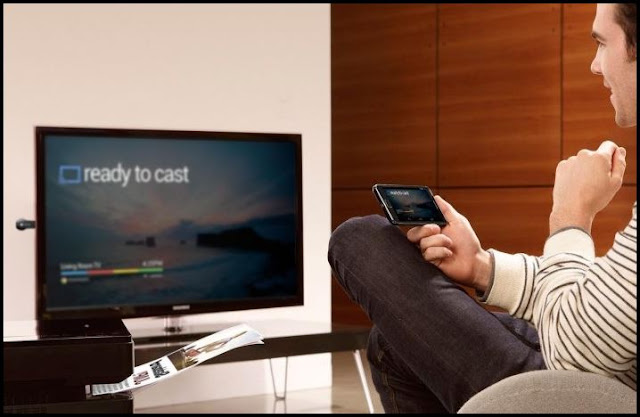
The ability to connect our TVs to our phones has made content consumption much easier. While Wi-Fi connections make it easier to mirror smartphones on Smart TVs, there are other ways to watch your phone movies if you don't have access to the internet. As a result, a lack of connection or a sluggish Internet connection should never be an excuse for missing your favorite show.
So, without Wi-Fi, how do you mirror a phone to a TV? There are several ways to mirror your smartphone to a TV, depending on the resources available. To begin, you can use converters to connect your TV to your smartphone via an HDMI cable. Peer-to-peer wireless connections are also a great substitute for Wi-Fi. If you want to watch a movie from a popular site like Netflix, though, you'll need Chromecast or other dongles. Without Wi-Fi, there are a few options for mirroring your phone to the TV.
Use one of the following methods to connect your phone to your smart TV without using Wi-Fi:
Use a USB-C to HDMI adapter
An HDMI cable is the greatest cable option for connecting your Smart TV to your phone. You'll need a converter because phones don't have HDMI connectors.
Without Wi-Fi, any USB-C to HDMI converter can effortlessly cast an Android or iOS screen to a TV. We recommend the Uni Thunderbolt or Anker USB-C to HDMI converters for the best results.
You may acquire the Lightning Digital AV Adapter from any store if you have an iPhone or iPad with a Lightning port. The adapter functions exactly like a USB-C to HDMI converter.
Check for additional possibilities if the HDMI and USB-C connections do not deliver the audio and visual signals. iPhone users are in the same boat. Fortunately, there's a slim probability that this connection option will fail.
Use Wi-Fi Direct to connect your phone and TV
Screen mirroring has been made easier with Wi-Fi Direct. You can stream all media files from your files without polishing because the connection works similarly to Bluetooth.
Your phone and TV, on the other hand, must have Wi-Fi Direct as part of their network connections.
To enable the network on your TV:
-
Go to your TV’s Menu
-
Scroll down to network and then select Wi-Fi Direct
-
Enable the Wi-Fi Direct
To connect the phone and TV using this peer-to-peer connection:
-
Go to your phone’s settings
-
Select Network & Internet
-
Tap the Wi-Fi option (or toggle it to the On position)
-
Go to Wi-Fi preferences (For Samsung smartphone users, select the three dots at the top right section of your screen)
-
Scroll down to the Advanced option
-
Select the Wi-Fi Direct
-
Search your TV’s protocol
-
Once you see it, tap connect

The steps may differ slightly depending on the television brand. Fortunately, Wi-Fi Direct is listed on the network list independent of the TV brand.
If your TV does not have this feature, you can use Miracast to mirror it with your phone, which works similarly to this connection.
Also Read: All You Need to Know About Wifi Extender and Mesh Wifi
Use the Miracast App to connect the two devices
If you get stuck while utilizing Wi-Fi Direct, the Miracast App is a great solution. Your TV must have Bluetooth in order for it to work. However, you must first install the program on your smartphone.
The software may be downloaded from Google Play and Apple App Stores. After you've downloaded the app to your phone, go to your TV's settings and turn it on.
To get Miracast on Smart TV:
-
Go to your TV’s settings
-
Scroll down to Display
-
Change the setting to ON
-
Search for Miracast devices
-
Connect the phone with the app
It's worth noting that the app isn't available for free on the App Store. If you have an Android device, though, it is free.

Purchase a Google Chromecast (or other dongles)
Some big streaming providers, such as Netflix, limit images when streaming from your phone to a TV without Wi-Fi in certain circumstances. Only in some cases will you hear the sound.
If you're having trouble with this, your best bet is to buy a Google Chromecast or a similar device. If you want to mirror your phone on TV to share photos and videos you've downloaded, the first three options will suffice.
Are you prepared to mirror your phone?
While mirroring your phone to a TV via a shared Wi-Fi network is quick and easy, you can also connect the two remotely.
The three best options include connecting the TV to a phone through HDMI cable (via a converter), WiFi Direct, and Miracast App.
The three options may not work if you're watching from Netflix or another site. Purchase a streaming dongle in this situation.
Related Posts
 cheap internet deals
cheap internet plans
cheap internet deals
cheap internet plans
Why Utah and the Mountain West Attract Remote Workers
Discover why Utah and the Mountain West are attracting remote workers with affordable living, reliable internet, lower utility costs, and growth.
 Technology
Why Your Internet Keeps Disconnecting and How to Fix It
Learn why your internet keeps disconnecting and discover proven fixes for router issues, Wi-Fi interference, faulty cables, and network instability.
 Broadband Deals
cheap internet deals
Subscription
Broadband Deals
cheap internet deals
Subscription
Affordable Internet and TV Bundles for the 2026 World Cup
Compare affordable internet and TV bundles for sports fans and enjoy reliable coverage of the 2026 World Cup without overspending.
 Internet Bundles
How to Detect ISP Throttling and Improve Your Internet Speed
Learn how to detect ISP throttling, identify common warning signs, test your connection, and improve internet speed for streaming, gaming, and work.
 cheap internet deals
cheap internet plans
cheap internet offers
cheap internet deals
cheap internet plans
cheap internet offers
Which ISP Offers the Best Long-Term Price Stability?
Compare ISPs with the most stable long-term pricing. Learn how to avoid bill increases, evaluate plans, and choose affordable internet service.