What is the Difference Between 2.4GHz and 5GHz Wifi?

Although "surfing the web" is an old term that makes your teenager shudder, your internet connection and surfing do have something in common. Your WiFi, like a skilled surfer, is all about catching the proper wave.
Key Difference Between 2.4GHz and 5GHz
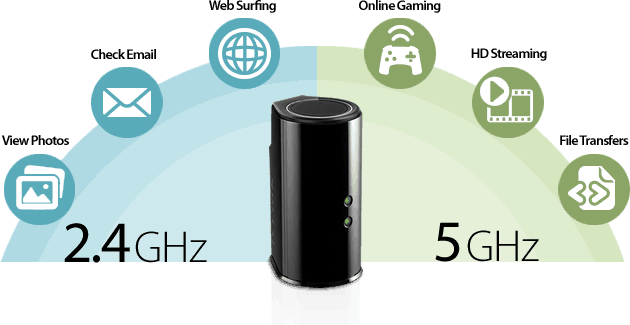
The 2.4 and 5 GHz frequency ranges are the unseen WiFi signals. These bands are responsible for transmitting data between your router and your wireless device. They're necessary if you want your wireless gadgets to have adequate internet speeds and WiFi coverage.
The distinction between the two is straightforward: it boils down to range and speed. 2.4 GHz Wi-Fi has a far longer range than 5 GHz Wi-Fi, thus it can cover a much larger area. Although you can connect to 2.4 GHz Wi-Fi from your basement, the connection will be slower.
Wi-Fi at 5 GHz is faster. However, because it is faster, it will not be able to get as far. With all of the technical jargon aside, when it comes to your internet connection, you trade one benefit for the other. Remember that not all routers support both Wi-Fi standards—many older routers only have 2.4 GHz, whereas modern routers frequently have both.
Why does 2.4GHz travel farther than 5GHz?
The higher the frequency of a wireless signal, the shorter its range is in most circumstances. Radio waves with a higher frequency (5GHz) lose more energy while traveling through solid materials like walls and floors than waves with a lower frequency (2.4GHz).
The 2.4GHz wireless frequency will go further despite the fact that the broadcasts are transmitted with the same power from the source.
Interference between 2.4GHz and 5GHz
Your WiFi connection may become slower as a result of interference.
Microwaves, baby monitors, radio-controlled toys, and garage door openers all use the 2GHz spectrum, which causes a significant disruption than the 5GHz spectrum.
Furthermore, the 2.4GHz frequency range only contains 11 channels for devices to operate on (3 non-overlapping channels – 1, 6, and 11).
With 23 channels in the 5GHz spectrum, you or your router may easily find the least noisy channel for you.
Can I Use Both at The Same Time?
Dual-band routers can receive and transmit at the same time on the 2.4 GHz and 5 GHz frequencies. The majority of ISP broadband routers are dual-band, and by default, both frequencies are activated. You can see two WiFi connections but you can only connect to one.
If your router does not support 5GHz then you should upgrade to a new one Wi-Fi Problems? Signs That You Need to Replace Your Router
Are There Other Frequencies that I Don't Know?
Yes, other Wi-Fi frequencies do exist, but it’s up to each country to decide which ones to use.4
Each frequency even has its own number of channels, but that gets more complicated. There’s 3.6 GHz, 4.9 GHz, 5.9 GHz, and so on. Within all of the frequencies available, countries decide which options are available and what channels are allowed.
Related Posts
 Safety
How to Shop Online Safely and Avoid Common Scams
Learn how to shop safely online by avoiding scams, protecting personal data, securing payments, and building smart long-term shopping habits.
 Regulations
Safety
Regulations
Safety
What Is Background Data Usage? Pros and Cons Explained
Learn what background data usage is, its benefits and drawbacks, how it affects internet consumption, and practical ways to reduce data usage.
 Regulations
Technology
Regulations
Technology
Why Fiber Internet Coverage Remains Limited in Some Areas
Learn why fiber internet is still unavailable in many areas, from infrastructure costs to regulations, and what alternatives exist while waiting for expansion.
 cheap internet plans
Subscription
cheap internet plans
Subscription
Frontier TV and Internet Packages Worth Considering Today
Explore Frontier TV and internet packages, compare speeds, features, bundle benefits, pricing options, and find the right plan for your home.
 cheap internet offers
How to Find Cheap Internet That Doesn't Feel Cheap
Learn how to get affordable internet without sacrificing speed. Compare providers, optimize your network, and save on your monthly bill with smart strategies.