How to Safely Browse the Internet?

Malicious websites will steal your data, where the spyware, malware, and virus are placed. However, not only fake websites will give you those problems, some big website will store sensitive users' data without consent, there is a lot of website of websites in many corners of the internet world. To keep your browsing experience safe, we have compiled a handy tip using a search engine responsibly.
Use a reliable and trusted search engine.
Your search engine could be collecting more information about you than you may know. We recommend using a private search engine like Search Encrypt or StartPage to protect your search terms from being linked to your identity.
Be careful about what you type into your search engine.
Using a search engine that doesn’t use encryption by default could let your search terms leak into the wrong hands. Avoid typing in your name and sensitive data like your social security number or credit card number.
Use multiple search engines.
You can limit the information a search engine collects about you by switching between search engines regularly.
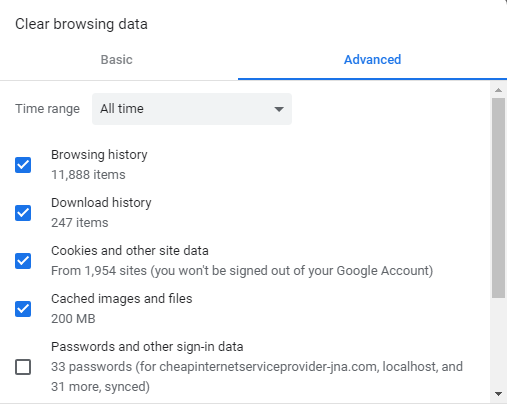
Delete cookies regularly.
Cookies can help websites you visit often load faster and improve your internet experience. However, websites also use cookies to track your behavior around the internet. By deleting unwanted cookies regularly, you protect yourself from unwanted tracking on the web.
Use encrypted search.
Most, but not all, search engines now use encryption on your search terms. This means that your ISP and other users on your network cannot see what you’re searching for.
Consider not signing in.
Signing in to your search engine or its connected services (e.g. Gmail and Google) just lets your search engine build a more complete profile about you. While this can provide some convenience, limiting the data profiles websites have about you is generally a responsible and smart practice.
Search safely on mobile devices.
Just because you are using a mobile device, like an iPhone or Android, doesn’t mean you are more private than a desktop user. You should still use privacy services like VPNs or private search engines.
Use VPNs or Proxies.
VPNs and proxies work to move your internet connection to another location so that websites can’t detect where you’re located and use your IP address to track you.
Avoid public Wi-Fi networks.
Although it’s not always possible, it’s best to avoid public Wi-Fi networks if possible. The network itself could be monitored by an unknown party or could expose you to other risks like injected malware or man-in-the-middle attacks.
For even more privacy, use as many safety measures as possible.
World Privacy Forum calls this the “kitchen sink approach to privacy”. By using multiple safety measures, you limit the reliance on any one protection method. You can also eliminate more threats that may have slipped by one privacy measure or another.
Related Posts
 Safety
How to Shop Online Safely and Avoid Common Scams
Learn how to shop safely online by avoiding scams, protecting personal data, securing payments, and building smart long-term shopping habits.
 Regulations
Safety
Regulations
Safety
What Is Background Data Usage? Pros and Cons Explained
Learn what background data usage is, its benefits and drawbacks, how it affects internet consumption, and practical ways to reduce data usage.
 Regulations
Technology
Regulations
Technology
Why Fiber Internet Coverage Remains Limited in Some Areas
Learn why fiber internet is still unavailable in many areas, from infrastructure costs to regulations, and what alternatives exist while waiting for expansion.
 cheap internet plans
Subscription
cheap internet plans
Subscription
Frontier TV and Internet Packages Worth Considering Today
Explore Frontier TV and internet packages, compare speeds, features, bundle benefits, pricing options, and find the right plan for your home.
 cheap internet offers
How to Find Cheap Internet That Doesn't Feel Cheap
Learn how to get affordable internet without sacrificing speed. Compare providers, optimize your network, and save on your monthly bill with smart strategies.