How To Find IP Address from Windows, Mac, Android and iOS?

How to Find IP Address? Well, asking Google for your public IP address is a straightforward approach to find it. The steps are straightforward:
Step 1: Open a web browser of your choice.
Step 2: Go to google.com
Step 3: In the search field, type "What is my IP address."
Your public IP address will appear at the top of Google's search results. Additional sites will also publish your public IP address, as well as other information, such as a rough estimate of your location.
Also, Read: How Important to Change Your IP Address
How can you find your private IP address in Windows?
The IPCONFIG command is the quickest way to discover your private IP address on Windows. Follow these steps to accomplish this:
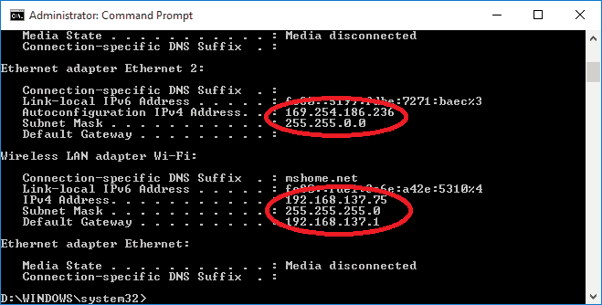
Step 1: From the Power User Menu, right-click on the Start button and select Windows Power Shell.
Step 2: In the Windows PowerShell window, type the command "IPCONFIG" and hit Enter. This will display all of the IP configuration information for Windows.
As shown above, the number you need displays next to IPv4 Address.
In macOS, how can you find your private IP address?
Step 1: Select System Preferences from the Apple icon. You can also go to the Dock and click on the System Preferences icon (if available).
Step 2: Choose a network to connect to.
Step 3: Select your network and then, at the bottom of the box, select Advanced.
Step 4: Go to the TCP/IP tab and click it.
How do you find your private IP address on Android?
Skip to the following section if you have a Samsung device. Otherwise, the instructions that follow are for vanilla Android.
Step 1: From the top, expand the Quick Settings menu and hit the "gear" symbol.
Step 2: Select Wi-Fi from the menu.
Step 3: Next to your current Wi-Fi connection, tap the "gear" symbol.
Step 4: Select Advanced from the drop-down menu.
Under IP Address, you'll find the number you're looking for.
Related Posts
 Safety
How to Shop Online Safely and Avoid Common Scams
Learn how to shop safely online by avoiding scams, protecting personal data, securing payments, and building smart long-term shopping habits.
 Regulations
Safety
Regulations
Safety
What Is Background Data Usage? Pros and Cons Explained
Learn what background data usage is, its benefits and drawbacks, how it affects internet consumption, and practical ways to reduce data usage.
 Regulations
Technology
Regulations
Technology
Why Fiber Internet Coverage Remains Limited in Some Areas
Learn why fiber internet is still unavailable in many areas, from infrastructure costs to regulations, and what alternatives exist while waiting for expansion.
 cheap internet plans
Subscription
cheap internet plans
Subscription
Frontier TV and Internet Packages Worth Considering Today
Explore Frontier TV and internet packages, compare speeds, features, bundle benefits, pricing options, and find the right plan for your home.
 cheap internet offers
How to Find Cheap Internet That Doesn't Feel Cheap
Learn how to get affordable internet without sacrificing speed. Compare providers, optimize your network, and save on your monthly bill with smart strategies.