Here's How You Can Fix a Hulu Playback Failure
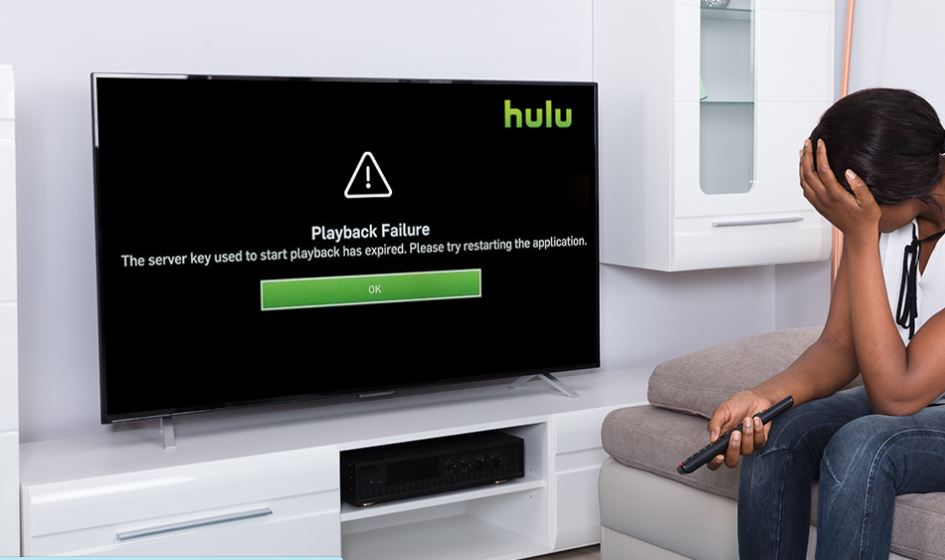
The error messages are not all that helpful when Hulu stops running. One of the most common error messages clearly means that there has been a playback failure. The error messages are usually seen on streaming devices like Roku, Amazon Fire TV, Fire Stick, consoles like Xbox, and Playstation, and smart televisions from Vizio, LG, and others.
But sometimes Hulu will also provide you with an error code that will help you find the source of the problem. If that doesn't happen and all it gives you is a playback failure message then you need to start with the basics such as testing your internet connection then see it from there.
When your device is unable to connect with the Hulu servers, it will give you playback errors. Or, the Hulu servers are unable to give a video stream.
The common causes of these issues are device, software, or home network, and you can fix it by doing some instructions. Some other times Hulu playback errors are caused by Hulu itself. That means that the Hulu server might have an issue.
If the problem is caused by Hulu itself, there's nothing you can do but to inform them and wait for a resolution.
If you want to rule out issues that you can actually fix yourself, here are the things you can do when on your streaming system you encounter a Hulu playback error:
Check that your internet connection can do streaming.
-
If your internet speed slows down Hulu videos may stutter, buffer, or may not play at all. Slow internet can also cause the audio to be out of sync.
-
Normal Hulu videos need 3.0 Mbps
-
With Live TV it needs 8.0Mbps
-
If you don't know your current internet speed, you can visit www.speedtest.net to see it.
Turn off and on your device and internet connection
-
Shutting down your streaming device and network equipment
-
Leave it for about a minute
-
Turn them back on and see if the error persists.
Use a wired connection if possible.
-
Try connecting your device to your router or modem with a LAN cable.
-
If the error goes away, either use a LAN connection to stream or moves your wireless router closer to the device you use to watch Hulu
-
If moving your router isn't practical, try using a mesh network, it will provide wider coverage.
Related : How Important to Change Your IP Address
Disconnect another device from your network
-
Sometimes having a lot of devices connected to your network will clog and make your internet connection slows down. The issue might be a limited bandwidth. Try disconnecting any other devices that you are not using.
-
Securing your network, and check if someone is connecting to your network without your knowledge. They might be the ones using all your bandwidth.
-
If the playback error goes away, you might probably need to buy a multi-band router or a router that allows you to configure and prioritize streaming.
Check the settings of your router.
-
There are routers that will allow you to prioritize certain traffic or equipment, set it to priority the device you are trying to watch Hulu on.
-
Changing the domain name server on your router.
After trying all the troubleshooting above and you are still getting the same error message. Then try deleting or resetting the Hulu app on your device. In some cases or devices, you can also turn off and on your equipment and test its internet connection.
Related Posts
 Safety
How to Shop Online Safely and Avoid Common Scams
Learn how to shop safely online by avoiding scams, protecting personal data, securing payments, and building smart long-term shopping habits.
 Regulations
Safety
Regulations
Safety
What Is Background Data Usage? Pros and Cons Explained
Learn what background data usage is, its benefits and drawbacks, how it affects internet consumption, and practical ways to reduce data usage.
 Regulations
Technology
Regulations
Technology
Why Fiber Internet Coverage Remains Limited in Some Areas
Learn why fiber internet is still unavailable in many areas, from infrastructure costs to regulations, and what alternatives exist while waiting for expansion.
 cheap internet plans
Subscription
cheap internet plans
Subscription
Frontier TV and Internet Packages Worth Considering Today
Explore Frontier TV and internet packages, compare speeds, features, bundle benefits, pricing options, and find the right plan for your home.
 cheap internet offers
How to Find Cheap Internet That Doesn't Feel Cheap
Learn how to get affordable internet without sacrificing speed. Compare providers, optimize your network, and save on your monthly bill with smart strategies.